A runway lookbook you walk through
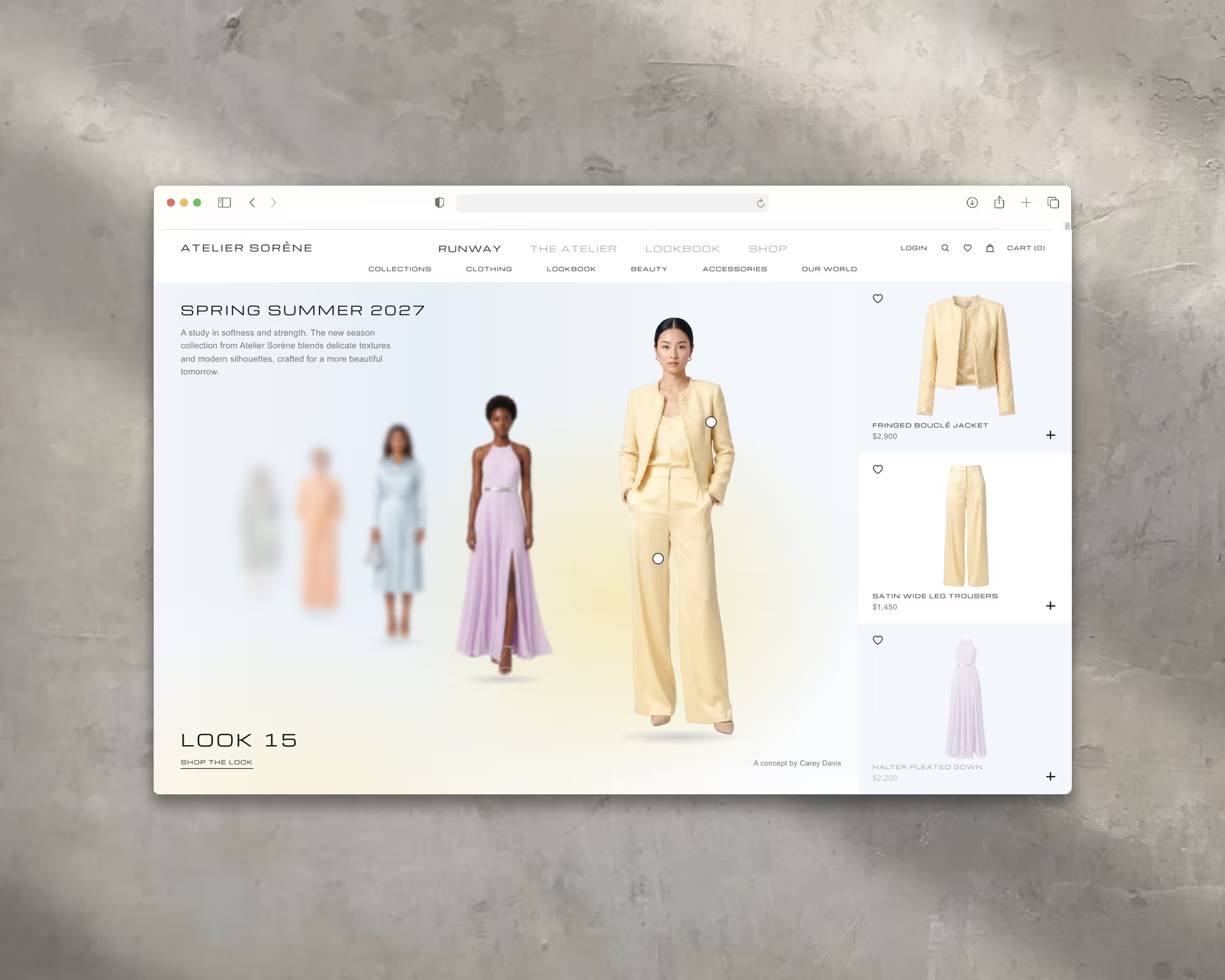
A runway lookbook for a made-up fashion house. Six AI-cast looks stand in a line, and every drag brings the next one to the front.
- Project Type
- Self-Initiated / Concept
- Role
- Art Direction · Interaction Design · Front-End Build · AI Imagery
- Year
- 2026
- Stack
- React · Next.js · GSAP
- AI Tools
- Higgsfield (Nano Banana 2.1) · Claude Code
Overview
Atelier Sorène is a fashion house I made up for this piece, and its Spring Summer 2027 lookbook is the whole site. Six looks stand in a line that runs back into a soft haze. Drag, scroll or press an arrow key and the line walks forward: the front look slides out past the product column, everyone moves up a place, and a new look steps out of the haze at the back.
I built it to test two things. How much of a fashion story can interaction carry on its own? And how much of the product, the models and the clothes included, can AI make to a standard I'd put my name on?
The Work
The piece started as an adaptation of an interaction study. I rebuilt it as a React component inside this site, moved the motion onto GSAP, and then kept designing on top of it.
One number runs the page: the current look position, as a decimal. Each model's place in the line, its size, its blur and its opacity all come from that value, read off a short table of depth stops, so the haze is tuned by eye instead of by formula. The product rail, the rolling look counter and the stage colour read the same number, which is why they never drift out of step. A drag moves the line directly under your hand. Let go and it settles on the nearest look.
Making the Product with AI
Every model and every product here was generated in Higgsfield with Nano Banana 2.1. The cast came first: six women, from their twenties to their fifties, no two alike, each in a two-piece look with its own colour so the line reads as a palette of butter, lilac, ice blue, apricot, sage and blush.
Each model was generated from a pose reference, so the line keeps its rhythm even though the people and the clothes are new. The products came second. Each one was generated from the model's own photo, with a set of reference product shots as the style guide, which is how the jacket in the rail is the same jacket she's wearing on the runway, fringe and all. After background removal, all 18 images went onto two sprite sheets, one for the models and one for the products. The page crops every figure and every product out of those two files, which come to under 700 KB together.
What I Added
These are the parts I designed on top of the original study:
- The stage takes on the colour of the look in front and blends between neighbours as the line moves, so dragging from Look 15 to Look 16 fades butter into lilac.
- Shop-the-look hotspots. When a look settles, two markers appear on the garments. Hover or tap one to see the name and price, and its card lights up in the rail.
- A choreographed settle. The look's two pieces step forward in the rail while the rest step back, and the hotspots pop in one after the other.
- The custom cursor stays above the models (in the study it slid behind them), and a screen reader now announces each look and its two pieces as it arrives.
Outcome
The finished piece works like a product page that happens to be a runway. You can browse the whole collection without reading a word and shop it without leaving the line. It also answered my AI question: every image here was generated, and it holds up because each one was briefed, checked against its look and fitted into a system I art-directed.